현재 카메라 기능
1. 모드
- Defalt : 기본 모드
- Exploration : 대상에게 포커스(줌인)
- Combat : 적과 플레이어 거리 기반 카메라 위치 / 락온
- Boss : Combat과 동일 로직 사용, 데이터 에셋에서 수치만 다르게 관리
2. 이펙트
- Zoom: Location을 받아 해당 위치로 줌인/아웃 효과
- Shake: Direction을 받아 해당 방향으로 쉐이크 효과(+약간의 수직 진동)
- Push: Direction을 받아 해당 방향으로 밀어냈다가 돌아오는 효과

이제 기획서를 다시 보면 카메라 볼륨 액터가 필요하다.
이것도 결국에 모드를 실행시켜주는 트리거이기 때문에 추가로 필요한 로직이 있다.
줌인, 줌아웃, 앵글 모드가 필요할 것 같다.
다 기존 베이스 코드에서 수치만 수정하면 되기 때문에 데이터 에셋만 추가로 만들어주면 된다.
그러니 맵이 어느정도 나왔을때 진행하겠다. TODO..
일단 보스 아레나에 보스 모드 실행을 위해 트리거 볼륨이 필요하다.
기존에 있던 테스트용 BP를 코드로 바꿔준다.
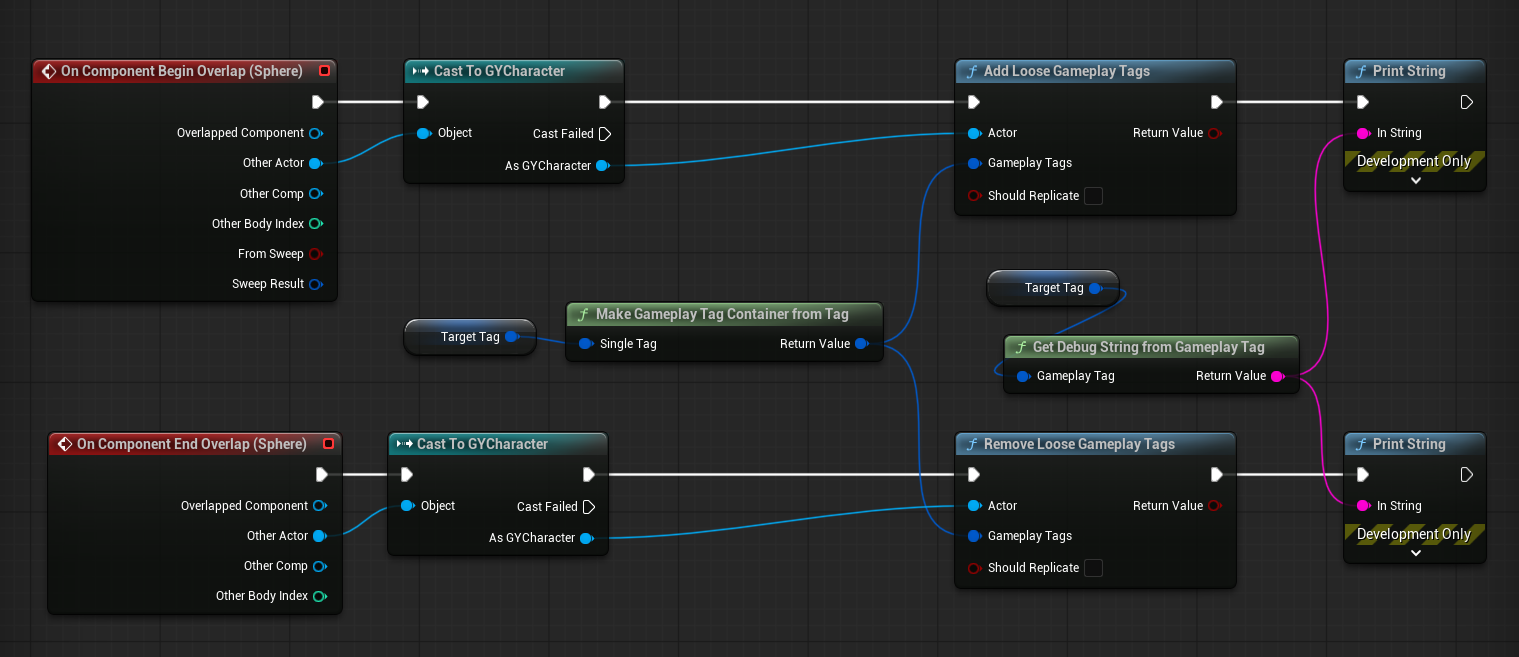
내가 C++이 되어 볼게 얍!
#pragma once

#include "CoreMinimal.h"
#include "GameplayTagContainer.h"
#include "GameFramework/Actor.h"
#include "CameraVolumeActor.generated.h"

class UBoxComponent;

UCLASS()
class GY_API ACameraVolumeActor : public AActor
{
	GENERATED_BODY()

public:
	ACameraVolumeActor();

protected:
	virtual void BeginPlay() override;

	UPROPERTY(VisibleAnywhere)
	UBoxComponent* BoxComponent;

	UPROPERTY(EditAnywhere, Category="GameplayTag")
	FGameplayTag CameraTag;

	UFUNCTION()
	void OnMeshBeginOverlap(
		UPrimitiveComponent* OverlappedComponent,
		AActor* OtherActor,
		UPrimitiveComponent* OtherComp,
		int32 OtherBodyIndex,
		bool bFromSweep,
		const FHitResult& SweepResult);

	UFUNCTION()
	void OnMeshEndOverlap(
		UPrimitiveComponent* OverlappedComponent,
		AActor* OtherActor,
		UPrimitiveComponent* OtherComp,
		int32 OtherBodyIndex);
};
#include "Camera/CameraVolumeActor.h"
#include "AbilitySystemBlueprintLibrary.h"
#include "AbilitySystemComponent.h"
#include "Components/BoxComponent.h"
#include "Logging/GYLogManager.h"
ACameraVolumeActor::ACameraVolumeActor()
{
PrimaryActorTick.bCanEverTick = false;
BoxComponent = CreateDefaultSubobject<UBoxComponent>(TEXT("Box"));
RootComponent = BoxComponent;
BoxComponent->SetGenerateOverlapEvents(true);
BoxComponent->SetCollisionEnabled(ECollisionEnabled::QueryOnly);
BoxComponent->SetCollisionResponseToAllChannels(ECR_Overlap);
}
void ACameraVolumeActor::BeginPlay()
{
Super::BeginPlay();
BoxComponent->OnComponentBeginOverlap.AddDynamic(
this,
&ACameraVolumeActor::OnMeshBeginOverlap);
BoxComponent->OnComponentEndOverlap.AddDynamic(
this,
&ACameraVolumeActor::OnMeshEndOverlap);
}
void ACameraVolumeActor::OnMeshBeginOverlap(UPrimitiveComponent* OverlappedComponent, AActor* OtherActor,
UPrimitiveComponent* OtherComp, int32 OtherBodyIndex, bool bFromSweep,
const FHitResult& SweepResult)
{
if (!OtherActor)
{
return;
}
UAbilitySystemComponent* ASC = UAbilitySystemBlueprintLibrary::GetAbilitySystemComponent(OtherActor);
if (!ASC)
{
return;
}
ASC->AddLooseGameplayTag(CameraTag);
GY_LOG(Player, CYS, "카메라 볼륨 입장 - %s", *CameraTag.ToString());
}
void ACameraVolumeActor::OnMeshEndOverlap(UPrimitiveComponent* OverlappedComponent, AActor* OtherActor,
UPrimitiveComponent* OtherComp, int32 OtherBodyIndex)
{
if (!OtherActor)
{
return;
}
UAbilitySystemComponent* ASC = UAbilitySystemBlueprintLibrary::GetAbilitySystemComponent(OtherActor);
if (!ASC)
{
return;
}
ASC->RemoveLooseGameplayTag(CameraTag);
GY_LOG(Player, CYS, "카메라 볼륨 퇴장 - %s", *CameraTag.ToString());
}
지난 팀플에서는 ASC를
GetAbilitySystemComponentFromPlayer(PC)플레이어 컨트롤러로 가져왔는데
UAbilitySystemBlueprintLibrary::GetAbilitySystemComponent(OtherActor)엑터로 가져오는 방법 좋은 것 같다. 굿~
'팀프로젝트 > 제목없음.최종플젝' 카테고리의 다른 글
| [TIL] 2026-05-22 | Gameplay Cue로 카메라 이펙트 제어하기 (0) | 2026.05.22 |
|---|---|
| [TIL] 2026-05-21 | 카메라 이펙트 (0) | 2026.05.21 |
| [TIL] 2026-05-20 | Gameplay tag를 사용한 탑다운 카메라 제어하기 (0) | 2026.05.20 |
| [TIL] 2026-05-15 | UE 로그 매니저 / 로그 시스템 (0) | 2026.05.16 |
| [TIL] 2026-05-15 | 퀘스트 데이터 구조 (0) | 2026.05.15 |